Step 3. Selecting components and configuring component installation
At this step, you can select the application components that you need to install. Click  to add or exclude an application component to be installed on your computer. The following options are available for component installation:
- Management Console, Security Server, and DLP Module (see the figure below)
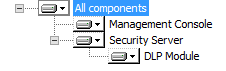
Component tree appearance with all the application components installed
- Management Console and Security Server (see the figure below)
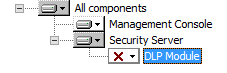
Component tree appearance with the DLP Module excluded from installation
- Management Console (see the figure below)
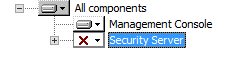
Component tree appearance with Security Server excluded from installation
The Management Console can be installed on a different computer for remote management of a Security Server of Kaspersky Security.
To configure component installation:
- In the Destination folder field, specify the path to the application installation folder. You can specify a path manually, or select one by clicking the Browse button.
By default, the application will be installed to C:\Program Files (x86)\Kaspersky Lab\Kaspersky Security for SharePoint Server\.
- In the Data storage folder field, specify the path to the folder, which will store application logs and databases. You can specify a path manually, or select one by clicking the Browse button.
By default, the application will save data to C:\Program Files (x86)\Kaspersky Lab\Kaspersky Security for SharePoint Server\data\.
If you need to discard the settings you defined and return to the default settings, click the Reset button.
- Click the Disk Usage button if you want to view information about free space available on local drives required to install the selected components.
The window that opens displays information about local drives.
To continue to the next step of the Setup Wizard, click the Next button.
Page top